unexpected token 'I' Invalid Date is not Valid Json- MIVIEWPOINT ERROR
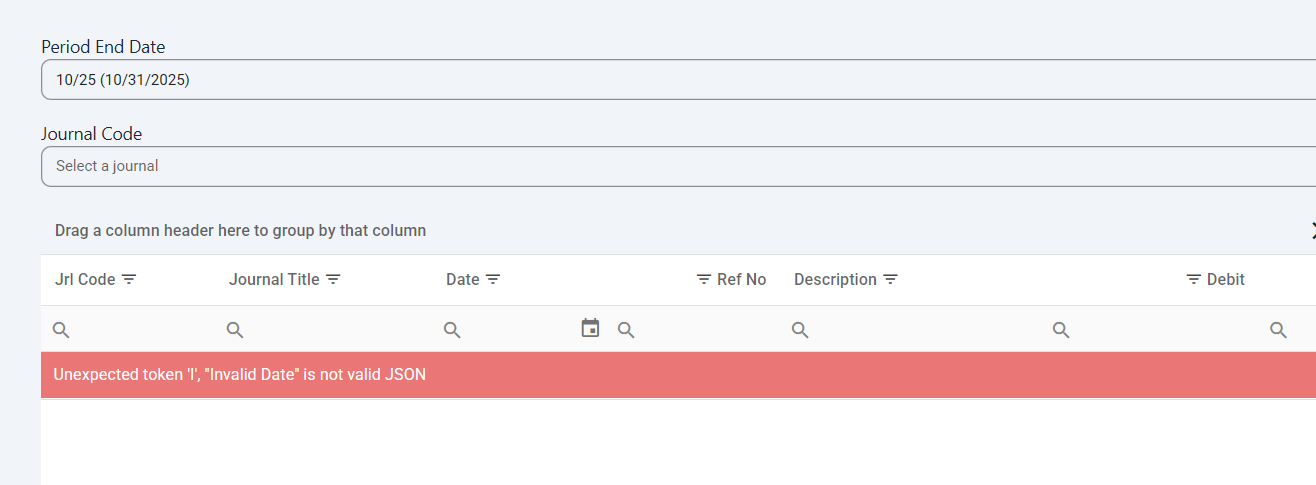
when someone receives this error, have them click the X to Clear Grid Layout

Related Articles
miViewPoint User Guide
Other miViewPoint User Guide This manual has been prepared by Civic Systems for use by customers and licensees of Civic and Caselle software. Information in this document is subject to change without notice. The software described in this document is ...miViewPoint Invoice Queues Errors
The query specified in the URL is not valid. The node count limit of 100 has been exceeded. To increase the limit set the 'MaxNodeCount' property on EnableQueryAttribute or 0DataValidationSettings. This article also applies if you see you have ...Setup Barcode for miViewPoint Extreme to Import Checks
This article helps customers interface the check image with the invoice through miViewPoint Extreme. Outlined are the steps for Caselle Clarity and Connect. Clients may choose to show the barcode on the check form or not. These instructions setup a ...miViewpoint- Watch List
Watch List The Watch List allows you to monitor the balances and activity of accounts you determine are a priority. The following lists the capabilities of the Watch List. Period End Date You can change the period end date to any date in the past or ...miViewpoint Invoice GL Detail Entry- Adding/Removing fields using Column Chooser
This is for Invoice Entry in miViewpoint Accounts Payable. You can use column chooser to add/remove fields from showing for your invoice GL detail entry portion of the invoice. See attachment for column chooser instructions.